Growth Strategy
What Should You Look for in a Shopify SEO Agency?
Evaluate a Shopify SEO agency with a weighted scorecard, Shopify-specific technical checks, a 30/60/90-day roadmap, pricing models and contract red flags.
Brilliant Brains · · Updated · 12 min read
A good Shopify SEO agency can show you, in your own store's data, where organic search is losing revenue and exactly how it will fix it. In practice that means four things: Shopify-specific technical skill (themes, apps, collections and filtered URLs), content that matches how your customers search, reporting tied to orders and revenue rather than rankings, and a roadmap with dated deliverables. Treat guaranteed rankings as a warning sign: Google's own guidance on hiring an SEO states that no one can guarantee a number one ranking.
What a Shopify SEO agency should actually do
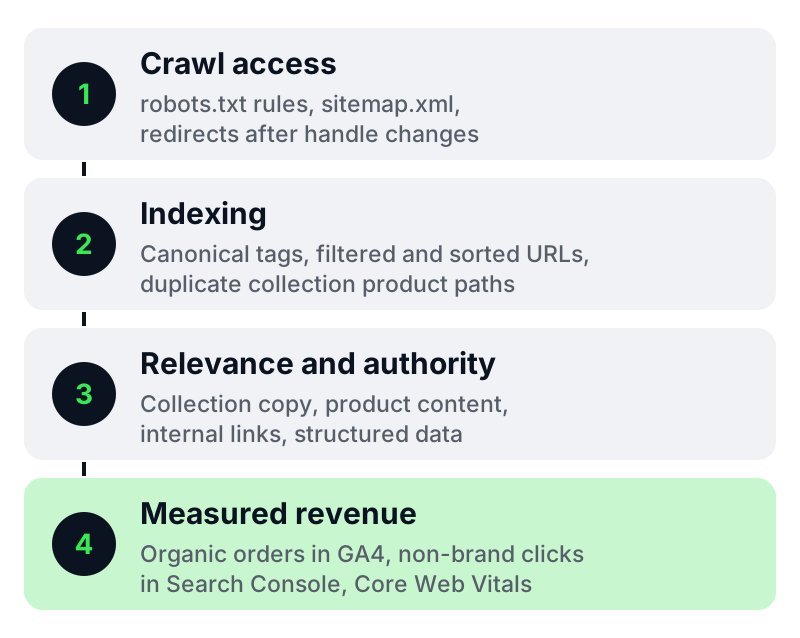
Shopify gives every store a sensible base. It automatically generates a sitemap.xml that lists products, collections, pages and blog posts, and its default robots.txt keeps admin, cart, checkout and duplicate sorted or filtered collection pages away from crawlers. An agency earns its fee in the gaps those defaults leave: theme performance, collection architecture, product content, internal links, structured data and reporting that proves commercial impact.
| Scope area | What good looks like | Why it matters on Shopify |
|---|---|---|
| Technical audit | Full crawl, Search Console review and a prioritised fix list | Themes and apps add code, duplicate paths and scripts over time |
| Collection strategy | Collections mapped to real search demand, with unique copy and controlled filters | Collections usually target the highest-volume category searches |
| Product content | Unique titles, descriptions, specifications, FAQs and image alt text | Manufacturer copy is often duplicated across many retailers |
| Internal linking | Navigation, breadcrumbs, related collections and guide-to-collection links | Moves authority towards commercial pages |
| Structured data | Valid Product, Offer and BreadcrumbList markup | Supports eligibility for richer search listings |
| Performance | Core Web Vitals tracked at the 75th percentile, plus an app and script audit | Slow mobile pages lose both visibility and conversions |
| AI search readiness | Detailed specifications, comparisons and clear answers on product pages | Shopify recommends detailed, structured product information for AI systems |
| Reporting | Organic revenue, orders, non-brand clicks and work shipped | Connects SEO activity to commercial results |
Shopify-specific technical SEO checks
These are the areas where generic SEO providers most often miss Shopify detail. Ask a prospective agency how it handles each one. A strong answer names the specific Shopify setting, template, app or report involved.
Duplicate product URLs from collections
Shopify can expose the same product at /products/product-handle and at collection paths such as /collections/collection-handle/products/product-handle. Check that the canonical tag always points to the /products/ URL and that collection grids link to it directly, so crawling and link signals are not split. Google's guidance on consolidating duplicate URLs explains how canonical tags, redirects and sitemaps work together as signals.
Faceted navigation and filters
Filter and sort parameters can create thousands of near-identical collection URLs. Shopify's default robots.txt already blocks common sorted and filtered collection paths, so an agency should first confirm what your theme and filter app actually generate, then decide whether any further control is needed.
robots.txt.liquid edits
Shopify lets you customise robots.txt through a robots.txt.liquid template, but treats it as an unsupported customisation and warns that incorrect use can result in the loss of all traffic. Any agency proposing changes should explain every rule, keep a change log and test the effect in Search Console.
Redirects after handle changes and migrations
Renaming products or collections, or migrating from another platform, needs a redirect map. Shopify manages URL redirects in the admin under Content, Menus and View URL redirects, and its SEO FAQ notes that missing redirects after a migration can affect search rankings.
Theme speed and app bloat
Each installed app can add scripts to every page. Ask for a list of apps and third-party scripts with their measured impact, and agree Core Web Vitals targets: Largest Contentful Paint of 2.5 seconds or less, Interaction to Next Paint of 200 milliseconds or less and Cumulative Layout Shift of 0.1 or less, measured at the 75th percentile of page loads.
Structured data and product feeds
Most Shopify themes output some Product markup. An agency should validate it, fill genuine gaps such as price and availability, and keep it consistent with the product data you send to shopping feeds. Review markup should only appear where it reflects real customer reviews shown on the page.
Titles, meta descriptions and handles
Shopify's guidance is to keep page titles to 60 characters or fewer and meta descriptions to about 160 characters. Title templates save time on large catalogues, but your top commercial collections and products deserve hand-written titles and descriptions.
A practical agency evaluation checklist
Use these questions in your first call. Good agencies answer with examples from comparable stores and are open about what they will not do.
- Which Shopify stores of a similar category or size have you worked on, and what changed in organic orders or revenue? Can we speak to one of those clients?
- What will you audit in the first 30 days, and what does the output look like?
- How do you handle duplicate product URLs, filters and canonical tags on Shopify?
- Which theme or app changes do you expect to recommend, and who implements them: you, our developer or a Shopify Partner?
- How do you research keywords for collections, products and guides differently?
- What does your link-building or digital PR work involve, and can we see examples of links you have earned?
- What exactly will we receive each month, and who reviews the report with us?
- How will you separate the effect of SEO from paid campaigns, promotions and seasonality?
- What access do you need, and do we keep ownership of all content, accounts and data if we part ways?
- What are the notice period and exit terms?
A scored comparison framework
Score each shortlisted agency from 1 (weak) to 5 (strong) on the criteria below, multiply each score by its weight and add the results. The weights are a starting point. Adjust them to your situation, for example by weighting technical depth higher if your catalogue is large or complex.
| Criterion | Weight | What a score of 5 looks like |
|---|---|---|
| Shopify-specific experience | 20% | Several comparable stores with verifiable outcomes and references |
| Technical depth | 20% | Clear answers on canonicals, filters, robots.txt.liquid, apps and speed |
| Commercial reporting | 15% | Reports organic revenue, orders and non-brand clicks from GA4 and Search Console |
| Roadmap quality | 15% | A dated, prioritised plan linked to your categories and margins |
| Content approach | 10% | A collection-first content plan backed by real search demand |
| Link-building transparency | 10% | Named tactics, real examples and no paid link schemes |
| Commercial terms | 10% | Clear scope, client ownership of accounts and a reasonable notice period |
Illustrative example: an agency scoring 5, 4, 3, 4, 4, 3 and 5 on the criteria above earns a weighted score of 4.05 out of 5. Treat any agency with a weighted score near 4 and no single score below 3 as a strong shortlist candidate. A high total that hides a 1 or 2 on reporting or link-building transparency is still a risk.
What monthly reporting should include
| Metric | Source | Why it matters |
|---|---|---|
| Organic revenue and orders | GA4, organic search channel | The commercial outcome of SEO |
| Non-brand clicks and impressions | Google Search Console | Growth beyond people who already know your brand |
| Priority collection and product performance | Search Console and GA4 | Shows whether the pages that matter most are improving |
| Indexing and crawl issues | Search Console page indexing report | Catches technical regressions early |
| Core Web Vitals | Search Console Core Web Vitals report | Tracks speed against the agreed thresholds |
| Work shipped and next priorities | Agency change log | Links activity to results |
Rankings for a short list of keywords can be a useful diagnostic, but they should not be the headline. Ask for the same report layout every month so trends are easy to compare, and agree upfront how GA4 attribution will be read alongside paid media.
A sample 30/60/90-day roadmap
Every store is different, so treat this as an example of the shape a good plan takes rather than a fixed schedule.
| Phase | Focus | Typical deliverables |
|---|---|---|
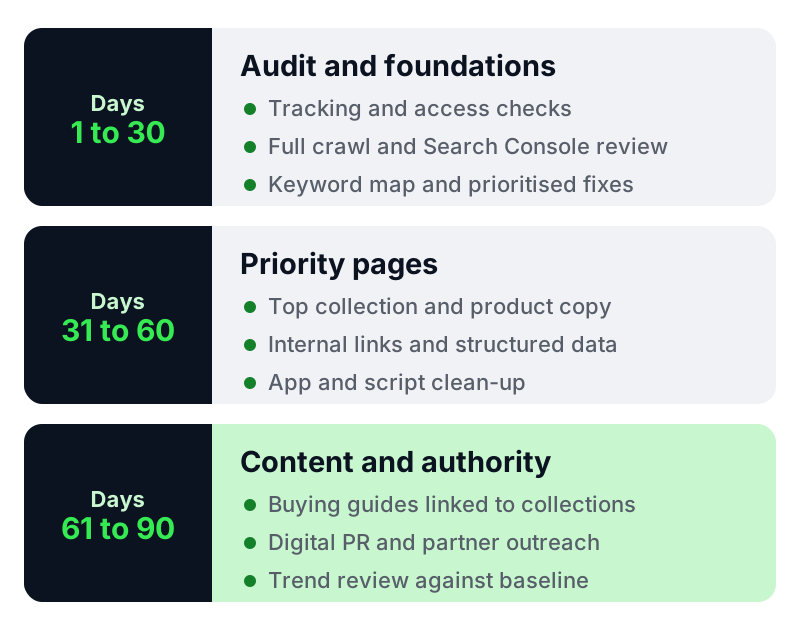
| Days 1 to 30 | Audit and foundations | Access and tracking checks, full crawl, Search Console review, keyword map for priority collections, prioritised fix list and quick technical fixes |
| Days 31 to 60 | Priority pages | Rewritten titles and copy for top collections and products, internal linking changes, structured data fixes, app and script clean-up |
| Days 61 to 90 | Content and authority | Buying guides and comparison content linked to collections, digital PR or partnership outreach, first trend review against the baseline |
Most stores should not expect large revenue movements inside 90 days. Search engines need time to recrawl and reassess pages, and competitive categories take longer. A good agency sets expectations for leading indicators, such as indexing, impressions and non-brand clicks, before it talks about revenue.
Pricing considerations
Shopify SEO is usually sold in one of four ways. None is automatically better. What matters is that scope, deliverables and responsibilities are written down.
| Model | How it works | Watch for |
|---|---|---|
| One-off audit | Fixed fee for a technical and content audit with recommendations | Who implements the fixes, and at what cost |
| Monthly retainer | Ongoing fee for an agreed scope of work | Vague scope such as "SEO optimisation" with no named deliverables |
| Project fee | Fixed fee for a migration, theme rebuild or content programme | Post-launch support and redirect checks |
| Hourly or day rate | Billed against time used | Time logs and a monthly cap |
Avoid comparing proposals on price alone. Compare what each one delivers per month, who does the work, and whether development hours are included. We have not quoted market price ranges because rates vary widely by country, catalogue size and scope.
Contract red flags
- Guaranteed rankings, traffic or revenue. Google states that no one can guarantee a number one ranking.
- Link building the agency will not describe. Google's spam policies treat buying or selling links for ranking purposes as link spam.
- Long minimum terms with no performance review point or notice period.
- The agency, rather than your business, owns your content, Search Console, GA4 or ad accounts.
- Requests for full write access to Search Console during an initial audit, when read access is enough.
- Reporting that shows rankings or traffic but never orders or revenue.
- Theme or robots.txt.liquid changes made without a written change log.
How Brilliant Brains approaches Shopify SEO
Our team combines technical SEO, collection and product content, and answer engine visibility through our SEO, AEO and GEO services, and pairs that work with website conversion optimisation so that additional organic visitors have a clear path to purchase. For D2C and e-commerce brands, organic search is planned alongside paid media and retention rather than in isolation. If you are deciding how much to invest in AI search, our explainer on the difference between SEO, AEO and GEO sets out what each one covers.
If you want an outside view of where your store stands, request a Shopify growth evaluation. We will review your technical setup, collection structure and reporting, and share a prioritised list of fixes.
Conclusion
The right Shopify SEO agency can show you specific, Shopify-aware fixes, report on orders and revenue, and commit to a dated plan without promising rankings. Use the checklist and scorecard above to compare proposals on evidence, and keep ownership of your accounts and content from day one.
Frequently Asked Questions
What does a Shopify SEO agency do?
It improves how a Shopify store is crawled, indexed and found in search. That covers fixing technical issues in the theme and apps, structuring collections around search demand, improving product content, building authority and reporting on organic orders and revenue.
How long does Shopify SEO take to show results?
Technical fixes can be picked up as soon as pages are recrawled, but meaningful growth in non-brand traffic and revenue usually takes several months, and longer in competitive categories. Ask for leading indicators such as indexing and impressions in the meantime.
How much does a Shopify SEO agency cost?
It depends on catalogue size, competition, market and scope. Agencies typically charge for a one-off audit, a monthly retainer, a fixed project or an hourly rate. Compare proposals on named deliverables and who does the work, not on headline price.
Is Shopify good for SEO?
Shopify covers several basics automatically, including a sitemap.xml and a default robots.txt that blocks checkout and duplicate filtered pages. Results still depend on theme performance, app load, collection structure and content quality.
Can I do Shopify SEO myself?
Yes, for many basics. Titles, meta descriptions, image alt text, product copy and collection descriptions are all editable in the Shopify admin. Specialist help becomes more valuable for theme performance, duplicate URLs, robots.txt.liquid, migrations and large catalogues.
What should a Shopify SEO report include each month?
Organic revenue and orders from GA4, non-brand clicks and impressions from Search Console, performance of priority collections and products, indexing issues, Core Web Vitals, work completed and the next month's priorities.
Sources
- Shopify Help Center: Finding and submitting your sitemap
- Shopify Help Center: Editing robots.txt.liquid
- Shopify Help Center: Adding keywords for SEO
- Shopify Help Center: URL redirects
- Shopify Help Center: SEO frequently asked questions
- Shopify Help Center: Optimising your store for AI
- Google Search Central: Do you need an SEO?
- Google Search Central: Consolidate duplicate URLs
- Google Search Central: Spam policies for Google web search
- web.dev: Web Vitals